News

What's new at Digimedia

Releases, updates and announcements.

Public Beta Public Beta · Freeware · Windows & macOS

Digimedia Player enters public beta

Digimedia Player plays broadcast video and audio files and puts the meters a control room needs right beside the picture: a peak programme meter with phase correlation, a loudness meter to ITU-R BS.1770 and a goniometer. Open a clip, watch it and listen to it, and measure it in the same window — its peaks, its stereo image and its loudness against the EBU R128 target — without reaching for a second tool. Available for Windows and macOS.
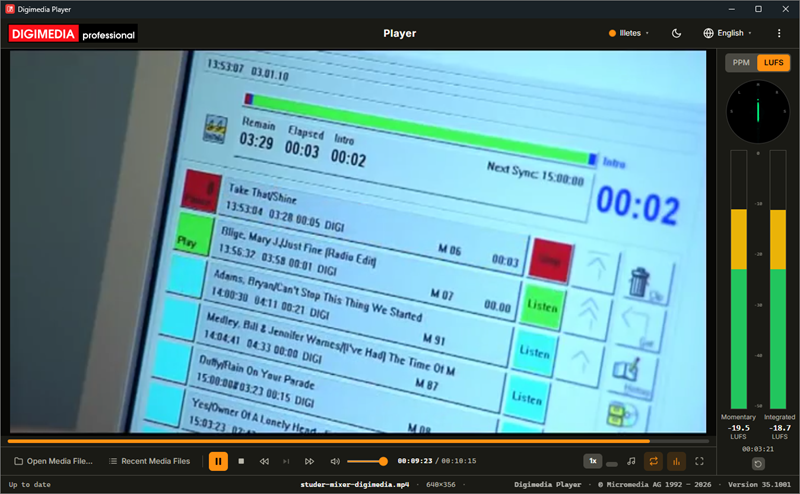
Digimedia Player — a video playing with the goniometer and the loudness meter beside the picture
A clip playing with the meter column beside it in LUFS mode: the goniometer at the top, momentary and integrated loudness below, and the running time of the measurement with its Reset button.

Meters beside the picture

A peak meter with phase correlation, a loudness meter and a goniometer run down the side of the window, in step with the sound.

Loudness to ITU-R BS.1770

Momentary loudness and gated integrated loudness, with a Reset that lets you measure a single passage against the EBU R128 target of −23 LUFS.

Measured before the volume control

Turn the listening level down or mute it altogether: the readings stay exactly where the programme puts them.

Frame steps and seven speeds

Step through a paused picture one frame at a time, play from 0.25× to 2×, jump ten seconds either way, and pick the audio track or the subtitles a file carries.

Aspect ratio and full screen

Correct a wrongly flagged picture to 16:9, 4:3, 21:9 or 1:1, then show it alone on the whole screen and keep control from the keyboard.

WASAPI or ASIO

Play to any output Windows lists, or straight to a professional audio interface through its ASIO driver, choosing which pair of its outputs carries the sound.
Public Beta Public Beta · Freeware · Windows Service

Digimedia Logger enters public beta

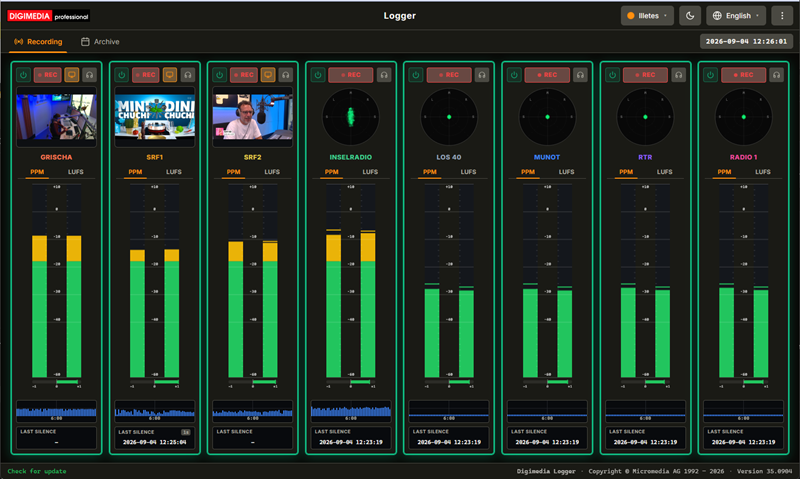
Digimedia Logger records what you broadcast, around the clock, so you can prove it later. It runs unattended as a Windows service, keeps up to eight audio and video channels rolling in one-hour segments, watches every one of them for silence, and puts the whole archive in a browser page — scrub the day, mark in and out, export the clip. Built for compliance recording, airchecks and post-broadcast verification.

Digimedia Logger — channel strips with metering, and the archive timeline
The Recording workspace: one strip per channel, with peak and loudness metering, a goniometer and live monitoring.

Eight channels, audio and video

Up to eight independent channels per instance, each from a soundcard or a network stream, with parallel video capture on stream channels.

Continuous, with retention

Gapless one-hour segments roll around the clock, and anything older than the channel's retention setting is pruned automatically.

Broadcast metering

True peak in dBFS with a phase correlation bar, EBU R128 momentary and integrated loudness, and a goniometer for the stereo image.

Silence alarms

Drop below the threshold for too long and the channel flags itself, a webhook fires and an email goes out — with a cleared notice when the signal returns.

Archive in the browser

A 24-hour grid, waveforms from a peak cache so they appear instantly, and playback with no client to install.

Trim and export in seconds

Mark the in and out points, audition the selection, then take a lossless WAV cut — or an MP4 remuxed server-side with its audio in sync.

Public Beta Public Beta · Freeware · Windows Service

Digimedia Dynamics enters public beta

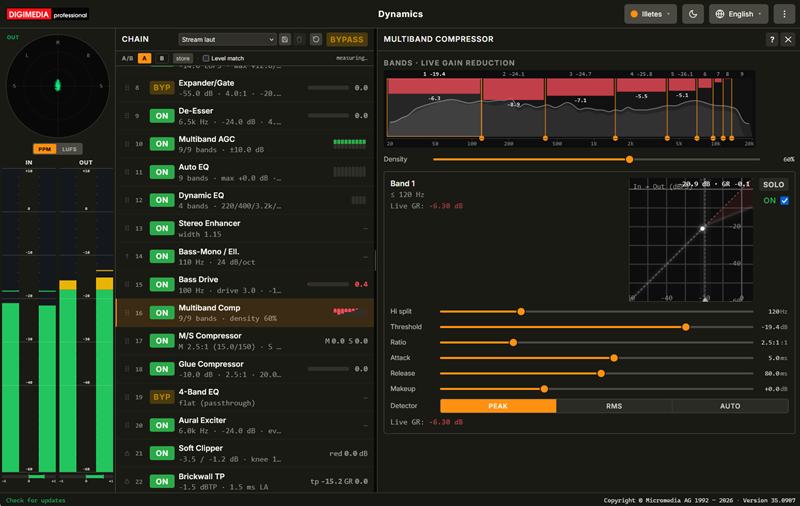
Digimedia Dynamics is the processor that sits in the transmission path. It takes a stereo signal from a soundcard, runs it through twenty-five stages — levelling it, balancing its spectrum, building density and holding an absolute true-peak ceiling — and returns it to a soundcard. It also streams straight to your internet radio servers, hosts up to eight of your own VST plugins wherever the chain needs them, and records an archive of hourly files in the format Digimedia Logger reads. Dynamics runs as a Windows service, so it starts with the machine and keeps going unattended for months; the interface is a browser page and only a remote control, and every parameter change takes effect live, without interrupting audio.

Digimedia Dynamics — meters, the processing chain and the multiband compressor panel
The workspace: meters on the left, the processing chain in the middle, and the selected stage's parameters filling the rest — here the Multiband Comp with its per-band gain reduction.

Twenty-five stages, eight plugin slots

From de-clipping, hum and hiss removal through EBU R128 loudness control and multiband levelling to a true-peak limiter, each switchable on its own — plus eight slots for your own VST plugins wherever the chain needs them.

A chain you can rearrange

Drag a row to move it. Dynamics holds the start of the chain fixed, where the waveform has to arrive unaltered, and the end, where the ceiling sits.

Metering that compares

Input beside output, peak-programme bars to IEC 60268-10 alongside EBU R128 momentary and integrated loudness, with a goniometer, a correlation bar and a true-peak readout.

Seven presets, three banks

From Signature, the house sound, to Transparent, which keeps only the protection. Chain A and Chain B hold your production settings, Temp holds your experiments, and whichever bank is selected is on air — switching between banks is inaudible.

Streams and an archive

Eight Icecast and Shoutcast streams — with live track titles for MP3, AAC and Ogg Vorbis listeners — and an archive of hourly WAV files in the format Digimedia Logger reads. A full disk costs you the recording, never the broadcast.

Built to be left alone

A Windows service that starts with the machine. A browser on that machine never needs a password; access from the network is refused outright until you set one.

Public Beta Public Beta · Freeware · Windows & macOS

Digimedia Transcript enters public beta

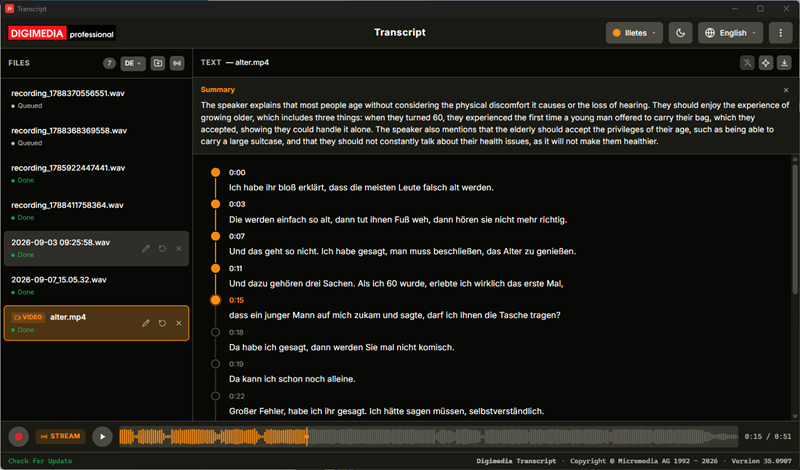
Digimedia Transcript turns speech into text without sending it anywhere. Recognition runs against a model on your own machine, so it works with no internet connection and recordings never leave the computer. Import an audio or video file — or record live and watch the text arrive a few seconds behind you — then correct it against a real waveform, name the speakers the app separated for you, and export it as a document or as subtitles. A dictation-device .dct file is read directly, with no conversion step. Available for Windows and macOS.

Digimedia Transcript — a timestamped transcript with speaker separation and a waveform
A finished transcript: timestamped segments with speaker separation, an optional summary above, and the waveform showing how far playback has run.

Nothing is uploaded

Speech recognition runs on your own machine against a local model, so it keeps working offline and your recordings stay where they are.

Import a file or record live

Audio, video and professional dictation .dct files, by button or by dropping them in — or capture a new take straight from your sound card.

Text while you speak

Live transcription arrives a few seconds behind, with a goniometer and peak and loudness metering in place of the files list while a take runs.

Corrections that follow the audio

Click a timestamp to jump playback there, click the text to edit it, and watch played segments colour in with the waveform. Everything saves itself.

Speakers, separated and named

Voices are grouped automatically and get coloured chips you can rename — for one segment or for every segment that speaker has.

Five export formats

HTML, plain text, RTF, and SubRip or WebVTT subtitles with proper timings — plus an optional summary from an Ollama server you run yourself.