News

What's new at Digimedia

Releases, updates and announcements.

Release Version 35.0730 · Freeware · Windows & macOS

Digimedia Explorer released

Digimedia Explorer finds every Audio-over-IP stream on your network and lets you pre-listen to any of them on your own sound card — with broadcast-grade metering. One unified, filterable list for AES67, RAVENNA, Dante and Axia/Livewire, plus clock and device discovery. No setup, no server: a single app.
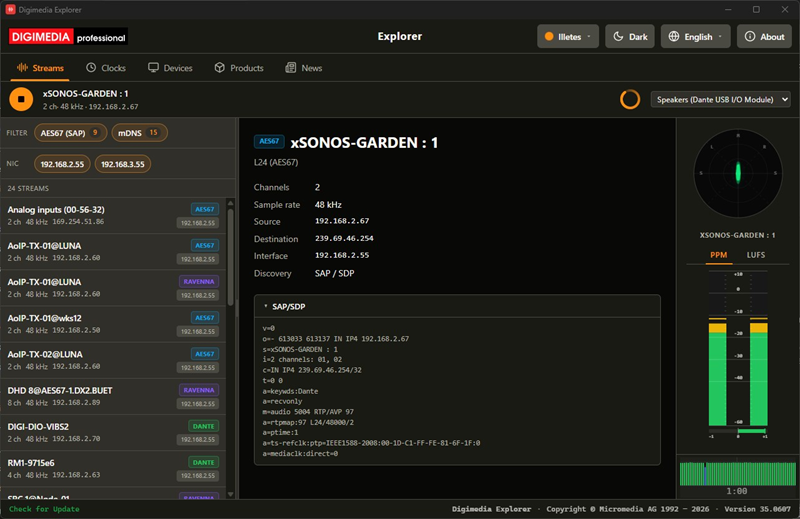
Digimedia Explorer — Streams view with live PPM, LUFS and goniometer metering
Streams view: live stream details (SDP), stereo goniometer and PPM/LUFS metering.

Universal discovery

AES67, RAVENNA, Dante and Axia/Livewire — all protocols in one unified, filterable list per NIC.

Clock discovery

PTPv1 and PTPv2 grandmasters with full clock-quality details on the Clocks tab.

Local monitor

Pre-listen to any stream on your chosen sound card; map L/R channels on multichannel sources.

Broadcast metering

Stereo PPM, ITU-R BS.1770 LUFS, goniometer (Lissajous), phase correlation and a live level history.

Device web UIs

Detects devices advertising a web interface (DHD, Digimedia, Axia and more) and opens them in one click.

Made to fit

15 themes (light & dark), 5 languages, multi-NIC filtering and a built-in update channel.
Release Version 35.0730 · Freeware · Windows & macOS

Digimedia Surface released

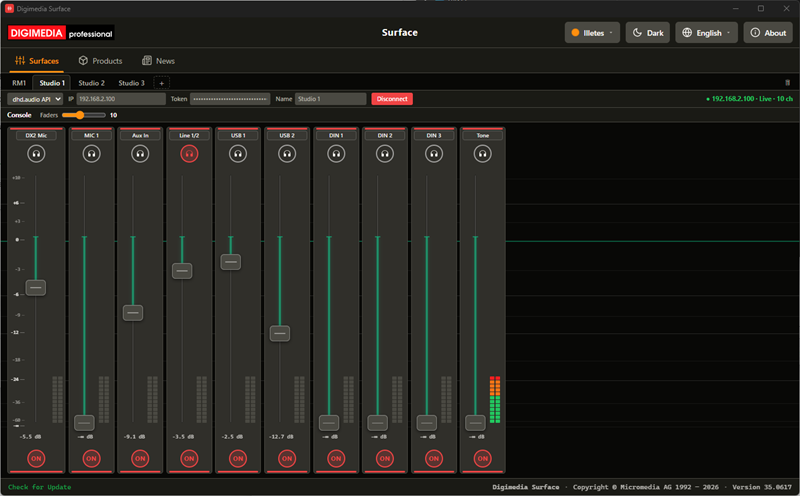
Digimedia Surface turns your computer into a mixing control surface for any DHD audio core. Pick one of three connection modes per workspace — the dhd.audio API, Ember+ or MIDI MCU — and ride faders, ON and PFL on a familiar console strip with broadcast-grade metering. Drive several cores at once in separate tabs, or run up to 32 parallel MCU links to your DAWs. No setup, no server: a single app.

Digimedia Surface — dhd.audio console with per-strip dB scale, faders, PFL and live metering
Console view: a live dhd.audio core (10 channels) with fader, PFL/headphone, ON and PPM metering per strip.

Three connection modes

dhd.audio API (WebSocket), Ember+ and MIDI MCU (RTP-MIDI) — one mode per Surfaces tab, each driving its own core.

Live mixer strip

Ride fader, ON and PFL on the shared console strip; positions and status are queried live the moment you connect.

MCU / DAW control

Emulates a Mackie Control surface that your DAW drives — up to 32 parallel RTP-MIDI links at once.

Broadcast metering

A per-strip dB scale and stereo PPM metering, sized for the motor-faders of the iCON P1-X surface.

Resilient link

Keep-alive with automatic reconnect; on disconnect the surface drops to idle so nothing reads stale.

Made to fit

15 themes (light & dark), 5 languages, several cores side by side in tabs and a built-in update channel.

Beta Beta phase running · Windows & macOS

Digimedia Audioeditor released

Digimedia Audioeditor is a professional, browser-based audio editor built on the AudioMass engine. Singletrack mode handles quick single-file edits; Multitrack mode layers multi-channel recording and mixing sessions with per-track faders, pan, mute and solo. A full effects chain — EQ, compression, limiting, reverb, delay and noise reduction — plus LUFS loudness normalization with streaming-platform presets round it out. Export to MP3, WAV, FLAC or a session file. All processing runs locally — no audio is ever uploaded to a server.

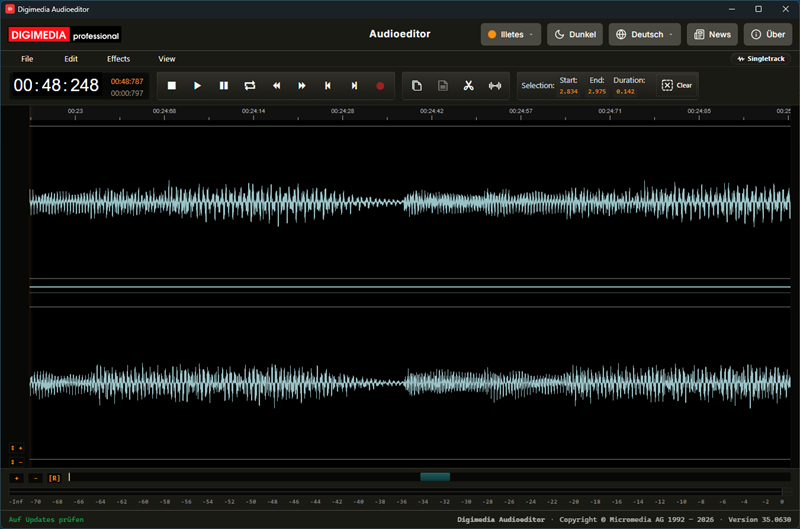
Digimedia Audioeditor — Singletrack Mode with stereo waveform and dB level ruler
Singletrack Mode: a stereo waveform with the selection tool, transport and a permanent dB level ruler.
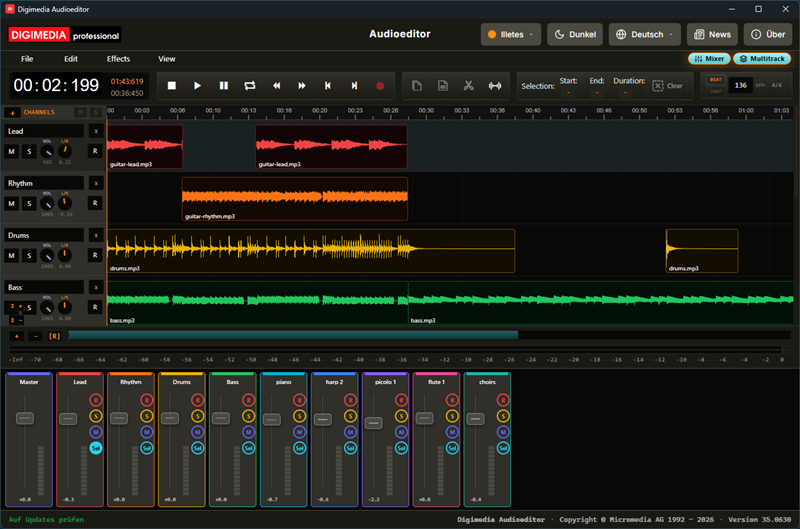
Digimedia Audioeditor — Multitrack Mode with Mixer open
Multitrack Mode: four tracks with coloured clip lanes and the Mixer open, showing ten channel strips with faders and meters.

Non-destructive editing

Unlimited Undo / Redo — nothing overwrites your original audio until you export.

Professional effects

Parametric and graphic EQ, compression, hard limiting, reverb, delay, distortion and audio repair tools.

LUFS loudness normalization

Measure and match integrated loudness to any streaming or broadcast target, including EBU R128.

Multitrack recording

Record and mix multiple tracks with per-track faders, pan, mute, solo and real-time meters.

Flexible export

MP3, WAV (16/24/32-bit), FLAC, or a full multitrack session file (.amss).

Runs anywhere

Desktop app for Windows, or directly in your browser — with local draft storage that works fully offline.

Release Version 35.0731 · Freeware · Windows & macOS

Digimedia Signage released

Digimedia Signage is a visual layout designer for BrightSign digital signage players. Arrange a background or overlay, HTML and RSS widgets, and up to two video windows on a canvas that mirrors your target screen exactly, then deploy the finished layout straight to a real player over the network — no BrightScript to write by hand. It's just as capable driving a broadcast studio screen, showing a live dhd.audio Views App view, as a lobby or retail display. No setup, no server: a single app.

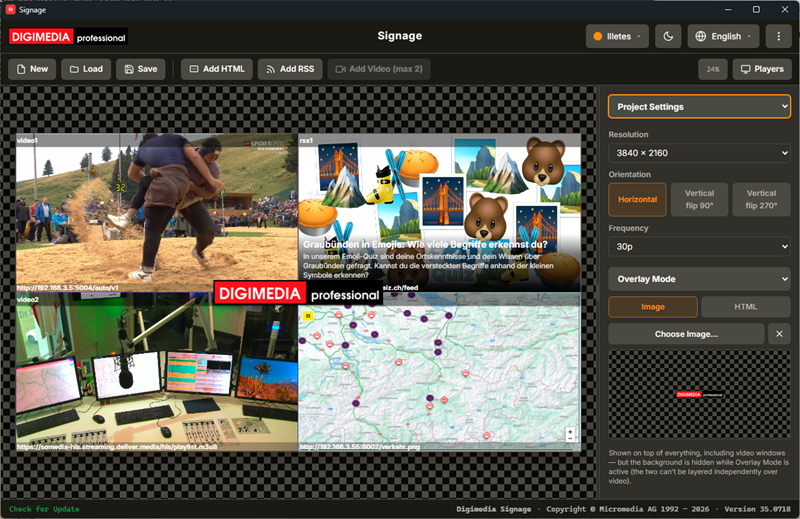
Digimedia Signage — layout canvas with widgets and the Inspector panel
Layout canvas: background, HTML/RSS widgets and the Inspector panel showing the selected widget's settings.

Visual canvas

Position a background or overlay, HTML and RSS widgets, and up to two video windows on a canvas that mirrors your target resolution exactly.

Overlay layer

An image or live web page shown on top of everything else — ideal for a logo, watermark or lower-third — with video layering that flips automatically.

HTML & RSS widgets

Show any web page in a positioned rectangle, or rotate automatically through an RSS or Atom feed's items.

Studio Screen ready

Point an HTML widget at a dhd.audio Views App URL to show a live console view full-screen — clock, meters, routing and more.

One-click deploy

Compiles the layout to BrightScript and uploads it straight to a real BrightSign player — no scripting required.

Made to fit

Several color themes, light and dark mode, and a built-in update channel.