News

What's new at Digimedia

Releases, updates and announcements.

Beta phase running Beta phase running · Freeware · Windows Service

Digimedia Logger enters beta

Digimedia Logger records what you broadcast, around the clock, so you can prove it later. It runs unattended as a Windows service, keeps up to eight audio and video channels rolling in one-hour segments, watches every one of them for silence, and puts the whole archive in a browser page — scrub the day, mark in and out, export the clip. Built for compliance recording, airchecks and post-broadcast verification.

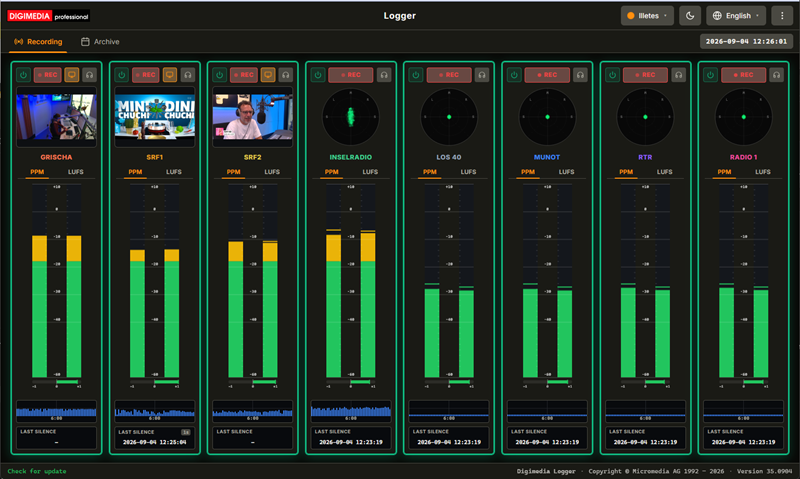
Digimedia Logger — channel strips with metering, and the archive timeline
The Recording workspace: one strip per channel, with peak and loudness metering, a goniometer and live monitoring.

Eight channels, audio and video

Up to eight independent channels per instance, each from a soundcard or a network stream, with parallel video capture on stream channels.

Continuous, with retention

Gapless one-hour segments roll around the clock, and anything older than the channel's retention setting is pruned automatically.

Broadcast metering

True peak in dBFS with a phase correlation bar, EBU R128 momentary and integrated loudness, and a goniometer for the stereo image.

Silence alarms

Drop below the threshold for too long and the channel flags itself, a webhook fires and an email goes out — with a cleared notice when the signal returns.

Archive in the browser

A 24-hour grid, waveforms from a peak cache so they appear instantly, and playback with no client to install.

Trim and export in seconds

Mark the in and out points, audition the selection, then take a lossless WAV cut — or an MP4 remuxed server-side with its audio in sync.

Beta phase running Beta phase running · Freeware · Windows Service

Digimedia Dynamics enters beta

Digimedia Dynamics is the processor that sits in the transmission path. It takes a stereo signal from a soundcard, runs it through twenty-two stages — levelling it, balancing its spectrum, building density and holding an absolute true-peak ceiling — and returns it to a soundcard. It runs as a Windows service, so it starts with the machine and keeps going unattended for months; the interface is a browser page and only a remote control. Every parameter change takes effect live, without interrupting audio, and every accepted change is written to an audit log with a timestamp.

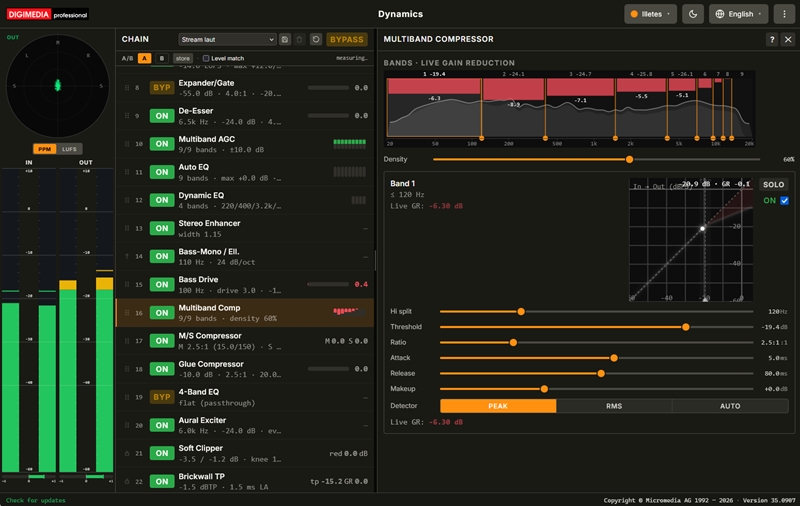
Digimedia Dynamics — meters, the processing chain and the multiband compressor panel
The workspace: meters on the left, the 22-stage chain in the middle, and the selected stage's parameters filling the rest — here the Multiband Comp with its per-band gain reduction.

Twenty-two stages

From de-clipping, hum and hiss removal through EBU R128 loudness control and multiband levelling to a true-peak limiter — each one switchable in or out on its own.

A chain you can rearrange

Drag a row to move it. Dynamics holds the start of the chain fixed, where the waveform has to arrive unaltered, and the end, where the ceiling sits.

Metering that compares

Input beside output, peak-programme bars to IEC 60268-10 alongside EBU R128 momentary and integrated loudness, with a goniometer, a correlation bar and a true-peak readout.

Presets and an honest A/B

Six presets ship, from every stage off to loud, and you can save your own. Two comparison slots match levels automatically, so the louder side cannot win on volume alone.

Live changes, logged

Every knob takes effect immediately without a dropout, and every accepted change is written to an audit log — so what changed, and when, has an answer.

Built to be left alone

A Windows service that starts with the machine. A browser on that machine never needs a password; access from the network is refused outright until you set one.

Beta phase running Beta phase running · Freeware · Windows Service

Digimedia Deepfilter enters beta

Digimedia Deepfilter cleans up speech and then finishes it. Each instance takes a signal from one soundcard, runs it through a DeepFilterNet neural pass that strips away what is around the voice — wind, traffic, a room full of other people — sends it on through a nine-stage broadcast chain, and returns it to another soundcard. Up to eight instances run side by side on one machine, each with its own pair of cards, its own model and its own settings, so a presenter, a guest and a telephone hybrid can be tuned separately without any of them disturbing the others. It runs as a Windows service and is driven entirely from a browser, so it starts with the machine and keeps going unattended.

Digimedia Deepfilter — the in and out meters, the nine-stage chain, and the Deepfilter stage with its model and controls
One instance: the in and out meters on the left, the nine stages in the middle, and the Deepfilter stage itself on the right — its model, attenuation limit, post-filter β and mix, with the peak and loudness read-outs for both sides above them.

One per soundcard

From one to eight fully independent instances, each with its own input card, output card, model and chain settings — and each able to stop or restart without touching the others.

Neural noise suppression

A DeepFilterNet pass removes what surrounds the voice, with an attenuation limit you set in dB rather than an on-or-off switch, and a live read-out of the improvement it is making.

Two models

The low-latency model halves the delay, removes more of every kind of noise and takes less of the wanted speech with it. What it costs is processing time — and each instance chooses for itself.

A full broadcast chain

Bandpass, R128 AGC, Expander, De-Esser, Compressor, Soft Clipper and a true-peak Brickwall follow the neural stage, each one switchable in or out on its own.

In and out, side by side

Meters before and after the chain, switchable between peak-programme and loudness, updating about twenty times a second straight from the audio engine.

Built to be left alone

A Windows service that starts with the machine and holds its cards. The machine's own browser always gets in; the network gets in only once you have set a password, and not at all before.

Beta phase running Beta phase running · Freeware · Windows & macOS

Digimedia Transcript enters beta

Digimedia Transcript turns speech into text without sending it anywhere. Recognition runs against a model on your own machine, so it works with no internet connection and recordings never leave the computer. Import an audio or video file — or record live and watch the text arrive a few seconds behind you — then correct it against a real waveform, name the speakers the app separated for you, and export it as a document or as subtitles. A dictation-device .dct file is read directly, with no conversion step. Available for Windows and macOS.

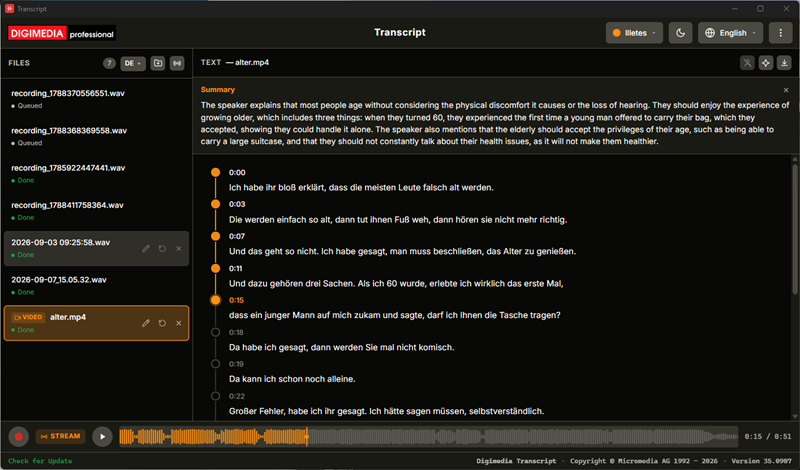
Digimedia Transcript — a timestamped transcript with speaker separation and a waveform
A finished transcript: timestamped segments with speaker separation, an optional summary above, and the waveform showing how far playback has run.

Nothing is uploaded

Speech recognition runs on your own machine against a local model, so it keeps working offline and your recordings stay where they are.

Import a file or record live

Audio, video and professional dictation .dct files, by button or by dropping them in — or capture a new take straight from your sound card.

Text while you speak

Live transcription arrives a few seconds behind, with a goniometer and peak and loudness metering in place of the files list while a take runs.

Corrections that follow the audio

Click a timestamp to jump playback there, click the text to edit it, and watch played segments colour in with the waveform. Everything saves itself.

Speakers, separated and named

Voices are grouped automatically and get coloured chips you can rename — for one segment or for every segment that speaker has.

Five export formats

HTML, plain text, RTF, and SubRip or WebVTT subtitles with proper timings — plus an optional summary from an Ollama server you run yourself.

Coming soon Coming soon · Freeware · Windows & macOS

Digimedia Reporter is coming

Digimedia Reporter puts a reporter's whole day in one window. The script editor counts the words and tells you how long the piece runs at broadcast reading speed, so a bulletin can be written to fit instead of trimmed on air. Beside it the Audioeditor cuts the tape, below it a mixer takes every input the machine can hear, and a broadcast codec carries the line back to the studio — a real one, following the EBU specification, not a consumer voice call. Quotes go into the manuscript as marked cues with their own length, exactly where the presenter needs them. Coming soon for Windows.

Digimedia Reporter — the script editor with its read time, the Audioeditor, and the mixer with a strip per input
The studio: the script with its word count and read time on the left, the Audioeditor top right, and the mixer along the bottom with a strip for every input and the phone line.

Written to fit

Words, characters and an estimated read time at 130 words per minute, updating as you type — so the piece is the right length before it goes on air, not after.

Quotes in the text

Drop a soundbite into the manuscript as a marked cue carrying its name and duration, where a presenter needs it: at the moment the fader has to move.

The Audioeditor, built in

The Audioeditor itself, filling its panel — cut, trim, fade, normalise to EBU R128, and export broadcast WAV or MP3.

A broadcast line, not a phone call

A SIP codec following EBU Tech 3326 with Opus, G.722 and an ordinary telephone fallback — and the call records while it runs, straight into the editor.

Contribution with picture

Remote guests and field reporters on a video stage with echo cancellation and automatic gain, screen sharing, a connection-quality roster and a chat channel for cues.

Built-in mixer

One strip per input with PFL, a fader at unity three quarters up, EBU R68 peak meters and a large ON button — plus a limiter on the master so nothing clips.

Beta phase running Beta phase running · Freeware · Windows Service

Digimedia Smarttool enters beta

Digimedia Smarttool is the piece in the middle. A studio is assembled from equipment by a dozen manufacturers, and almost none of it speaks the same language: the console talks one protocol, the automation system sends datagrams, the video switcher expects something else again, and the studio light is on a lighting bus. Smarttool connects to all of them, maps whatever each one exposes into one tree of parameters, and lets you link any of them with a rule — optionally through a short script. It runs as a Windows service, starts with the machine, and is operated from a browser.

Digimedia Smarttool — the Nodes tab with connected devices and a console’s parameter tree, each leaf carrying a Rule and Store box
The Nodes tab: connected devices on the left with their live state, and the selected console's parameter tree on the right — every leaf showing its value, its type and a Rule and Store box.

One tree per device

Connect a device and its faders, tallies, sensors and settings appear as folders you can browse — with the current value, the type and when it last changed.

Rules across protocols

Link any parameter to any other, whatever they speak. One rule can drive several destinations at once, each with its own transformation.

A script where you need one

Pass a value straight through, drop it into a template, or run a short Lua or JavaScript script with every stored variable available by name.

Consoles, video, lighting, sensors

DHD and Lawo, Telos Axia, D&R desks over USB with no driver, Wheatstone, MIDI, MQTT, video switchers, playout, signage, Modbus, SNMP, Art-Net and Hue.

State that survives a reboot

Stored variables keep their value across a restart, so a rule can know what happened before it ran.

Rules on the clock

The scheduler fires a rule on the clock rather than on an event: at an exact date and time, on a repeat from minutes to months, or on a plain cron expression. That covers the station’s morning start-up, the nightly reset, a periodic transmitter check.

Beta phase running Beta phase running · Freeware · Windows Service

Digimedia Visualradio enters beta

Digimedia Visualradio is an automatic camera director for radio. It listens to every microphone, watches the fader and on-air state of every channel on the console, and works out who is genuinely speaking rather than who is merely audible — then cuts the cameras to match, driving a Blackmagic ATEM, OBS Studio, vMix or a PTZ camera that points at the right seat before it goes on air. What makes it watchable is the restraint: a microphone that is only catching the room is ignored as spill, a shot is held long enough that an interjection cannot bounce the picture back and forth, two people talking over each other send it wide, and a music bed settles it back there. An operator can take any camera by hand at any moment, or change the pace mid-show. It runs as a Windows service, starts with the machine, and is operated from a browser.

Digimedia Visualradio — the control view, with the on-air camera in red beside the shot the director intends to take next in green
The control view: on the left in red, what is on air now — the shot, its running time and the remaining hold; on the right in green, what the director intends to take next.

The faders count too

Level alone is not enough. A channel only becomes a candidate while its fader is open and it is on air, so a presenter leaning into a closed microphone changes nothing.

Spill is recognised as spill

In one room every voice reaches every microphone. Open channels are compared against each other, and anything running more than about 6 dB below the loudest is ignored.

Shots that hold

After a cut the camera is locked for a moment, so an interjected “yes” cannot bounce the picture back and forth. Hold longer for a relaxed segment, shorter for a fast morning show.

Two voices, one wide shot

When people talk over each other nobody is really the subject, so it goes wide — and when the talking stops for a bed or a jingle, it settles back there.

The gear you already own

ATEM, OBS Studio, vMix and NDI sources — plus PTZ cameras that recall a preset per speaker, so one camera can cover more than one seat.

A tally the presenters can see

A large tally for a confidence monitor or a tablet: red for whoever is on air, amber for the wide shot, a timer, and a cue telling the next presenter their camera is coming.

Coming early 2027 Coming early 2027 · Freeware · Windows Service

Digimedia Scheduler is coming

Digimedia Scheduler is the part that decides what goes on air. A station's format lives in a handful of decisions — which categories of music exist, how often each may come back, what an hour is built from, how long before an artist or a song may return — and Scheduler is where those decisions are written down and then carried out. You draw the hour as a wheel of positions, group twenty-four such hours into a day template, assign templates across the month, and let it build the day: the engine fills every music position from the right category, discards anything that would break a separation rule, scores the rest and takes the best fit, hour after hour, in seconds. The finished day goes to Digimedia Playout. It runs as a Windows service, starts with the machine, and is operated from a browser. Arriving early in 2027.

Digimedia Scheduler — the clock editor, with the positions of a daytime hour on the left and the same hour as a sixty-minute dial on the right
The clock editor: the positions of a daytime hour on the left, and the same hour on the right as a sixty-minute dial with every element as its own segment.

Categories that come round on time

How often a song returns is arithmetic, not a setting: songs in the pool divided by positions per hour. Keep the answer odd and the rotation drifts across the day instead of landing every morning at eight.

Separation that is never bent

The same artist does not come back inside two hours, the same song not inside a day and a half. The engine leaves a hole before it breaks either of them.

The hour as a wheel

Lay the positions out and watch the hour fill beside them as a dial — music, jingle, ident, sweeper, bed, commercial, news or voice track, each one a segment, with the running total against sixty minutes.

Fixed points, hit exactly

Pin the news to the top of the hour and the engine works backwards to it and chooses what comes before, so the hour arrives on time rather than close to it.

A day template, then a month

Twenty-four clocks make a day, and the calendar colours every date by how far it has got: assigned, generated and waiting, or published and gone.

Straight into Playout

The approved day is written to the folder Digimedia Playout watches. A nightly job can build tomorrow and publish it with nobody at the desk.

Coming Q1 2027 Coming Q1 2027 · Freeware · Windows & macOS

Digimedia Planner is coming

Digimedia Planner puts everything a station or a studio makes in one place, and treats it the way output actually works: an episode, the segments it is built from, the stories they tell, the social posts cut out of them, and the individual takes and files underneath. All of it moves across a production board and onto a broadcast calendar, the rundown is written segment by segment with the durations adding up as you type, and the audio and the video are cut in studios built into the app itself. Recordings dropped in are transcribed in the background, and the finished result is published to podcast directories, YouTube and your playout system from the same screen. Arriving in the first quarter of 2027.

Digimedia Planner — the production board with five columns of episode cards
The production board: five columns from idea to published, with channel, air date, checklist and completion gauge on every card.

Content for podcast and broadcast

Five levels instead of one big file — episode, segment, story, post and item — each with its own fields, and each worked on in its own right.

A board and a calendar

Five columns from idea to published, then drag a card onto a day to give it an air date — with channel colours, status badges and a completion gauge throughout.

One workspace for every card

Outline, production checklist, media items, status, host and air date in a flat two-column layout, with the studios one click away.

Rundown and teleprompter

Segments with speakers, cues and durations that add up as you write, planned against actual, and a full-screen prompter for air.

Studios and transcripts built in

The Audioeditor with a full effects chain and EBU R128 normalisation, a multi-track video timeline with lower thirds and 4K export, and speech-to-text running in the background.

Publish everywhere at once

A Podcasting 2.0 feed with instant notification, a YouTube upload with chapters, and an export to Digimedia Playout and Cartwall.